Showing posts with label promotion. Show all posts
Monday, October 5, 2015
Be A Guest Writer For Hudson Valley Etsy's Blog!
We love blogging and sharing with you what is new with the team, but we are also looking for guest writers to contribute to our blog. If you are based in the Hudson Valley with a small business or you provide a service in the Hudson Valley helping artist and small businesses, we would love to hear from you!
Maybe you're an Accountant in the Hudson Valley with some tax preparation tips for small businesses. Or you're a Wedding Photographer and would like to share how you scout locations in this beautiful part of New York state. You can be a Farmer or Gardener - we love locally sourced food too!
We would also love to hear from charities in the Hudson Valley. With the Holidays approaching, we know this time of the year puts people in the giving mood. We would love to help you spread the word for your cause.
Our goal is to not only support our local handmade makers, but the greater community that we live in. If you are interested, please email us at hvetsy@gmail.com and we'll get back to you!
Labels:
blogging,
guest blogger,
guest writing,
hudson valley,
marketing,
new york,
promotion,
small business
Monday, May 12, 2014
In My Studio: Label Making
How to make your own Fabric Labels
In order to save money buying in professionally made custom labels I have been making my own. The results look great and are very easy and cheap to do. In this tutorial I give you the steps in order for you to make your own:
Materials
Printable transfer paper
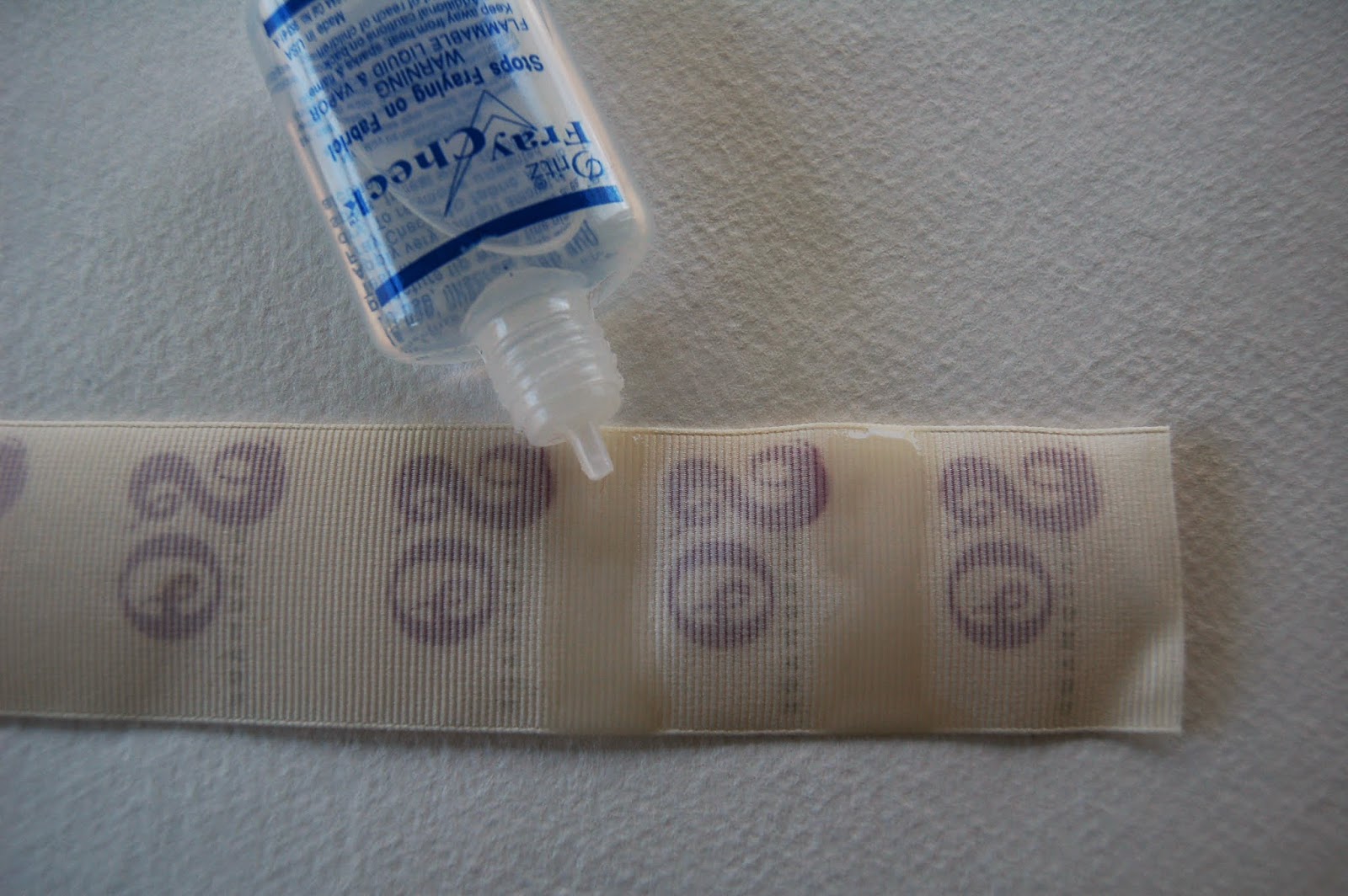
Fray Check
Iron
Sharp scissors
Ribbon
4) Heat the iron to its hottest setting and iron one strip of logos onto the ribbon. Make sure the iron gets really hot and then before it cools down quickly remove the backing paper.
5) Apply the fray check to the back of the ribbon in the area between the logos and leave to dry.
6) Once dry cut the labels
In order to save money buying in professionally made custom labels I have been making my own. The results look great and are very easy and cheap to do. In this tutorial I give you the steps in order for you to make your own:
Materials
Printable transfer paper
Fray Check
Iron
Sharp scissors
Ribbon
Method
1) On your computer take a copy of your logo and insert it into a word document. Measure your ribbon and scale the logo so it will fit onto the ribbon. It will look best if the background of your logo is left white.
2) Once its the correct size click the 'format' tab at the top of the word document. Find the 'rotate' tab and click the option 'flip horizontally'. This will invert your logo so that it will be the correct way around when printed.
3) Copy this version of the logo and paste in columns on the document (as below left). Print this document out onto the transfer sheet making sure you print on the correct side of the paper. Cut into strips (below right)
6) Once dry cut the labels
7) Apply the labels to your products, remembering not to iron over the label once its been attached as this will melt it.
Good luck and good making!
Sarah Omura - So Handmade
Labels:
craft tutorial,
diy,
fabric labels,
hudson valley etsy team,
label making,
labeling,
logo,
marketing,
promotion
Monday, September 17, 2012
Craft Fair Displays Part Two
More Displays from the Garrison Craft Fair
This stunning display belongs to GaryYatteau, who constructs sailboat models of wood, copper, and antique brass. I so admire the skill of this clever and talented artist, who not only makes one of a kind yacht sculptures, but also built these neat pilings, shelves and a nautical box to show them off. His customers must feel like they’ve entered a seaside village in Newport or Nantucket.
Beautiful and irresistible!
Be sure to keep checking the HVNY Blog for our latest posts. Later this month is I will attend the Fall Crafts at Lyndhurst in Tarrytown, NY. This is a major high end fair and I will be sure to share with you what these craftspeople do to make their work stand out for the crowds.
Jody Lee from astudiobythesea.etsy.com
Thursday, September 6, 2012
Craft Fair Displays Part One
| Come in and buy me! |
![]() |
| Take me home, please. |
A black basket and child’s
chair adds to the charm!
Many of us are constrained to
keep our displays as light and simple as possible. Sarah-Maria of Meerwiibli has two racks for her
dresses, two tables for her accessories, a mannequin and even a dressing room
for her customers of light and easily assembled materials. Her tablecloths, banners, and even her
hangers match the colors of her clothing designs, making a fun and enticing
display.
I loved the clean modern style
of L&M Studio! It was like
stepping into a chic shop in NYC.
Her shelves are made from Ikea furniture and wire cables attached to her
tent frame hold up her wonderful birdhouses, lamps, and planters. Gorgeous work in a great setting!
More displays from the
Garrison Craft Fair coming soon!
a Studio by the Sea
Tuesday, June 26, 2012
How To Twitter For Etsy!
Having an online shop isn't just setting up shop, posting your items and walk away. If you sell online, you have to have a presence ONLINE! This can be through a blog, a Facebook page, Pinterest, Tumblr, or my favorite - Twitter.
If you have an Etsy shop but you're still not quite into the whole Twitter thing, it's ok, let's hold hands. Allow me to walk you through how Twitter can be your friend and bring views to your Etsy items and shop.
First you must have a Twitter account because you'll need one to sync with your Etsy shop under your Account settings.
You may already notice that every listing on Etsy has a Twitter button....
This button is actually for anyone to use, it allows a person to tweet your item. When you click that button, a pop-up window appears
You can even tweet your own items from your shop to appear in your Twitter followers feed. This is what I do when I renew a listing. When I add a brand new item to my shop, it is the first thing I do after I hit that "publish" button.
If you're ready to get started in the world of Twitter, just jump right in! Start following people - because I'm sure you know people with Twitter accounts. The more you follow, the more you'll get follows back. You can even follow the Hudson Valley Etsy Team at @HVNYTeam!
Share your Twitter link with your friends and family. Don't feel like you have to tweet something constantly, you can keep it strictly shop-related, like a flash-newsletter in 140 characters or get chatty like I do. Etsy encourages their sellers to tell their story and help customers get to know the person behind the shop - Twitter is a great tool to do just that and still control just how much you wish to share about yourself. See you in the Twitterverse!
Another great resource to check out: Etsy's Guide To Twitter
If you have an Etsy shop but you're still not quite into the whole Twitter thing, it's ok, let's hold hands. Allow me to walk you through how Twitter can be your friend and bring views to your Etsy items and shop.
First you must have a Twitter account because you'll need one to sync with your Etsy shop under your Account settings.
You may already notice that every listing on Etsy has a Twitter button....
This button is actually for anyone to use, it allows a person to tweet your item. When you click that button, a pop-up window appears
You can even tweet your own items from your shop to appear in your Twitter followers feed. This is what I do when I renew a listing. When I add a brand new item to my shop, it is the first thing I do after I hit that "publish" button.
If you're ready to get started in the world of Twitter, just jump right in! Start following people - because I'm sure you know people with Twitter accounts. The more you follow, the more you'll get follows back. You can even follow the Hudson Valley Etsy Team at @HVNYTeam!
Share your Twitter link with your friends and family. Don't feel like you have to tweet something constantly, you can keep it strictly shop-related, like a flash-newsletter in 140 characters or get chatty like I do. Etsy encourages their sellers to tell their story and help customers get to know the person behind the shop - Twitter is a great tool to do just that and still control just how much you wish to share about yourself. See you in the Twitterverse!
Another great resource to check out: Etsy's Guide To Twitter
Subscribe to:
Posts (Atom)